.png?width=180&height=55&name=welbi_logo_colour%20(6).png)
Overview
When residents wear an approved NxtGen Care wearable, their location within the community can be matched to scheduled programs in Welbi. If a resident is physically present in the location where a program is taking place, attendance is automatically recorded in Welbi, including the duration of their attendance.
Staff can still review and edit attendance details in Welbi as needed.
How Automatic Attendance Works
-
A resident wears a NxtGen Care wearable (Liveable).
-
NxtGen tracks the resident’s location throughout the day.
-
NxtGen compares location data to Welbi’s program calendar.
-
If a resident is detected in the program location during the scheduled time:
-
Attendance is automatically recorded
-
Time spent in the program location is captured as the attendance duration
-
-
Attendance syncs from NxtGen to Welbi shortly after the program ends (typically within minutes).
-
Automatically recorded attendance is labeled “Recorded by NxtGen” in Welbi.
Residents are matched between Welbi and NxtGen using their PointClickCare ID, ensuring data is correctly aligned across systems.
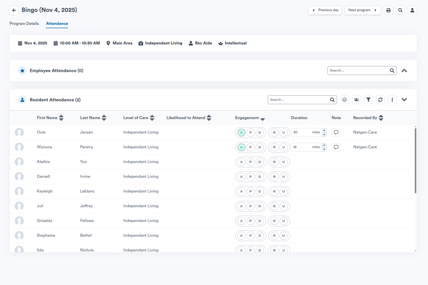
When Automatic Attendance Applies
Automatic attendance is recorded when all of the following conditions are met:
-
The resident is wearing a charged NxtGen wearable
-
The program is scheduled in Welbi
-
The program has a defined physical location
-
The resident is physically present in that location during the program
When Attendance Should Be Logged Manually
Attendance should be entered manually in Welbi in the following situations:
-
1:1 interactions
-
The resident is not wearing a wearable or the wearable is not charged
-
Programs without a physical location
-
Outings or off-site programs
-
Self-directed engagement that occurs outside the community
Manual attendance entered in Welbi will also sync back to NxtGen Care when applicable.
Editing and Enhancing Attendance Data in Welbi
Staff can edit automatically recorded attendance in Welbi to add additional context, including:
-
Adjusting attendance duration
-
Setting or updating engagement levels
This information contributes to Welbi’s engagement insights and recommendation engine.
What This Looks Like in NxtGen Care
When a program is created in Welbi:
-
The program is synced to the NxtGen Care calendar
-
The calendar sync runs automatically once per day (typically in the morning)
-
The current month and the following month are kept in sync
A “Sync Welbi Calendar” button is also available in NxtGen Care, allowing calendars to be refreshed manually at any time.
Troubleshooting Tips
If attendance data does not match between systems, check:
-
Is the resident wearing their wearable?
-
Is the wearable charged?
-
Does the program have a defined location?
-
Do attendance minutes match in both systems?
-
Do program locations match in Welbi and NxtGen?
If issues persist, contact Welbi Support with details about the program and resident(s) involved.