.png?width=180&height=55&name=welbi_logo_colour%20(6).png)
Before you start
Welbi uses one logo file per community across multiple tools, including print and digital experiences. Because the logo appears on different background colors and layouts, it’s important to upload a logo that meets the specifications below.
Logo specifications
Your community logo must meet all of the following requirements:
-
File type: PNG
-
Color: Full-color logo
-
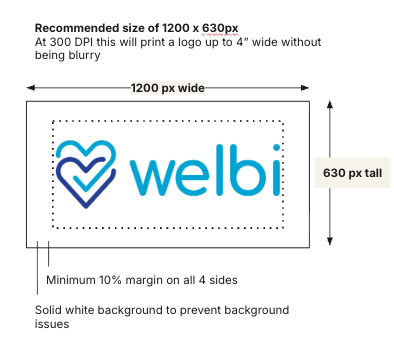
Background: Solid white (not transparent)
-
Size: 1200 × 630 pixels (landscape)
-
Padding: At least 10% margin on all sides
-
At 1200 × 630 px, this equals 120 px of padding on each side
-
These specifications have been tested to ensure your logo looks clear and consistent everywhere it’s used.
Where your logo appears
The same logo file is used across multiple areas of Welbi, including:
-
Print calendar designer
-
Community Portal
-
Website calendars
-
Digital signage
-
Canva app
Using one standardized logo helps ensure consistent branding across all formats.
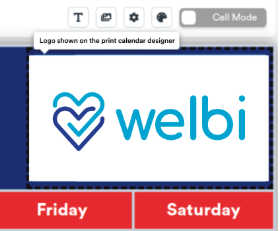
Note that when you are adding an image into a cell (header or blank cell) you may need to select 'Fit' to have it fit to the cell properly.
FAQs
Can I upload a logo with a transparent background?
We recommend uploading a logo with a solid white background.
Some areas of Welbi—such as the print calendar designer—allow full-color backgrounds behind the logo. Transparent logos may be placed on unpredictable background colors, which can make them difficult to read.
Can I upload a logo in a different size or aspect ratio?
You can upload a logo in a different size or aspect ratio, but it may not display as expected.
Logos that don’t match the recommended dimensions may appear smaller than intended or scale inconsistently across Welbi. For best results, use 1200 × 630 pixels.
Why is padding required around the logo?
Padding helps ensure your logo remains readable in all layouts.
The print calendar designer allows full-color backgrounds in the header where the logo appears. Including padding prevents the logo from touching the edges or blending into the background.
Need help?
If you’re unsure whether your logo meets these requirements or need help preparing your file, contact the Welbi team for support.