
Before using Friend Matching:
- Ensure the Friend Matching feature is enabled for your community.
- Make sure resident profiles, assessments, and attendance records are updated regularly to improve recommendation quality.
- Staff should remember that Friend Matcher is a recommendation tool and does not replace staff judgment.
Common uses:
- Helping new residents make connections after move-in
- Re-engaging residents who are socially isolated or returning from hospital
- Planning dining seating and program groupings
- Keeping track of friendships and residents who shouldn't be paired, even as staff change
- Showing families that their loved one is building relationships, including in memory care
- Briefing resident ambassadors before they welcome a new resident
Access Friend Matching
- Open a resident’s profile.
- Click the Friends tab.
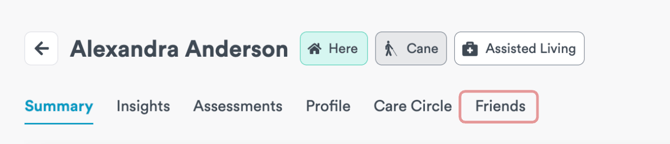
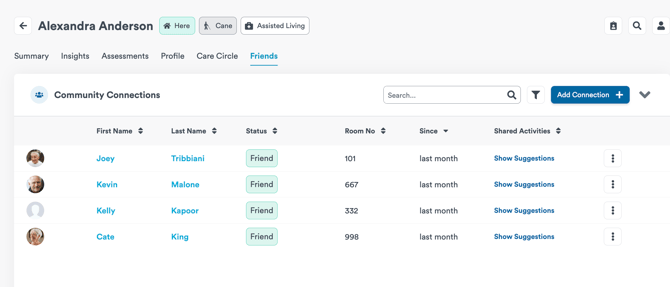
The Friends tab includes:
- Suggested friend recommendations
- Community Connections table
- Manual connection management
- Friendship status tracking
Review Suggested Friends
Friend Matching automatically generates a ranked list of residents who may be socially compatible.
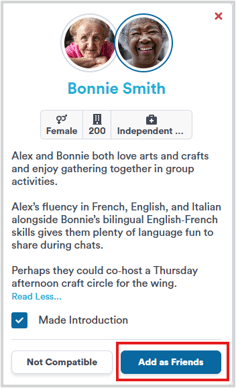
Each suggestion card includes:
- Resident name and profile photo
- Age
- Gender
- Room number
- Level of care or home area
- A plain-language explanation describing why the residents may connect well
The explanation may include:
- Shared interests or hobbies
- Similar participation preferences
- Complementary personalities or routines
- Suggested ways to introduce the residents through programs or activities
Tip: introduce residents around the suggested activity — for example, invite both to movie night — rather than introducing them cold.
Add a Friendship Connection
- Open the resident’s Friends tab.
- Review the suggested match.
- Click Add as Friends if the residents have formed a connection.
Once added, the relationship will appear in the Community Connections panel.
Track Introduction Statuses
Staff can track different relationship outcomes directly in Friend Matcher.
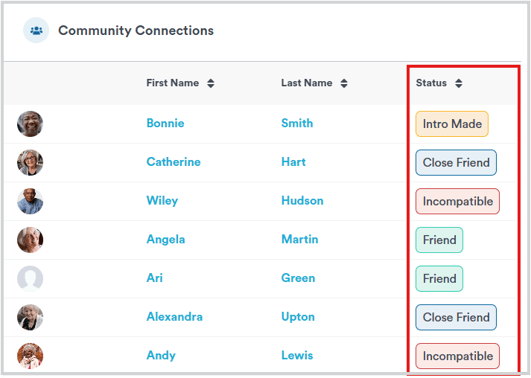
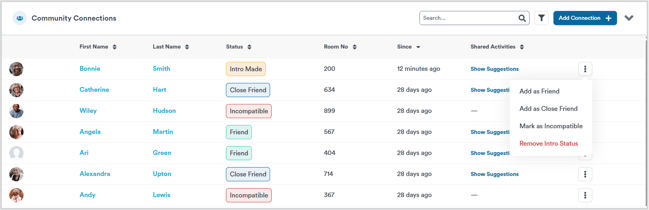
Available statuses include:
- Introduction Made — staff introduced the residents
- Friend — residents are now friends
- Close Friend — stronger friendship confirmed later
- Incompatible — residents should not be paired again
- Dismissed — temporarily removes the suggestion from recommendations
Use the Community Connections Panel
The Community Connections panel allows staff to monitor relationships over time.
From this panel, staff can:
- View friendship statuses
- See room numbers
- Review last updated dates
- View shared activity suggestions
- Add manual connections
- Filter inactive residents
How Friend Matcher Works
Friend Matcher analyzes resident information to identify possible social connections within the same community.
Welbi reviews information from:
- Resident profiles
- Assessments
- Attendance history
The system looks for patterns such as:
- Shared interests
- Similar routines
- Common backgrounds or experiences
- Personality similarities
- Participation preferences
If your community uses conversational assessments, Friend Matcher may also use information gathered during those conversations to improve recommendations.
Best Practices
To improve recommendation quality:
- Keep resident profiles updated
- Complete assessments thoroughly
- Record attendance consistently
- Review recommendations regularly
- Use staff judgment before facilitating introductions
Friend Matcher works best when communities maintain detailed resident information.
Important Notes
- Friend Matcher only creates recommendations within the same community.
- The feature is designed for friendship-building, not romantic matching.
- Staff remain responsible for deciding whether introductions are appropriate.
- Residents marked as incompatible or already connected will not continue appearing as suggestions.
- Match explanations refresh periodically and may not update immediately after profile changes.
Expected Result
After using Friend Matcher, staff will be able to:
- Identify potential resident connections faster
- Track introductions and friendship outcomes
- Support resident belonging and engagement
- Reduce manual matching work across teams
Troubleshooting Recommendations seem inaccurate
Recommendation quality may be affected by incomplete resident information.
To improve results:
- Update resident profiles
- Complete assessments
- Ensure attendance is being tracked regularly
If a resident does not appear in suggestions
Residents may not appear if:
- They are already marked as a friend or incompatible
- Their profile lacks enough information
- The suggestion was previously dismissed
Need more help? Contact your Customer Success Team by email at support@welbi.co.