.png?width=180&height=55&name=welbi_logo_colour%20(6).png)
Welbi lets you give each team member a default Level of Care, so the pages they use most often open already filtered to the residents they work with. That means less time adjusting filters and a more relevant view from the moment they log in.
This was designed for communities where different team members focus on different Levels of Care or home areas, and want Welbi to reflect that automatically.
Where it lives
A team member's default Levels of Care are set in their employee settings, within their profile. You can set this when you create a new employee, or update it for an existing one at any time.
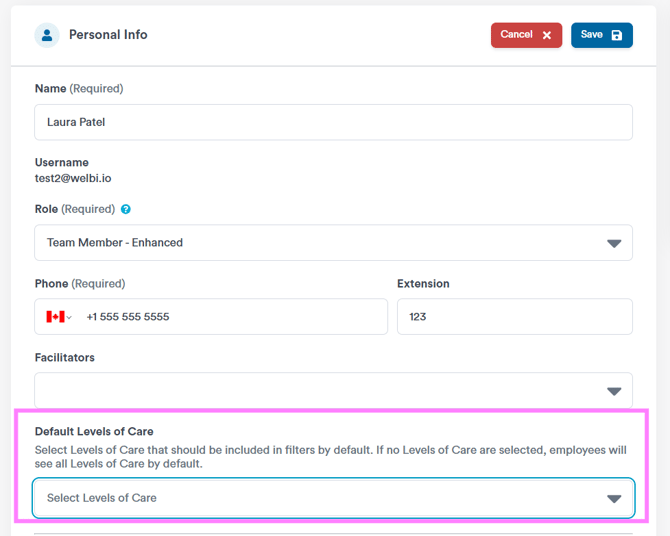
Setting it up
For a new team member:
- Create the employee user.
- Select their default Levels of Care.
- Save the profile.
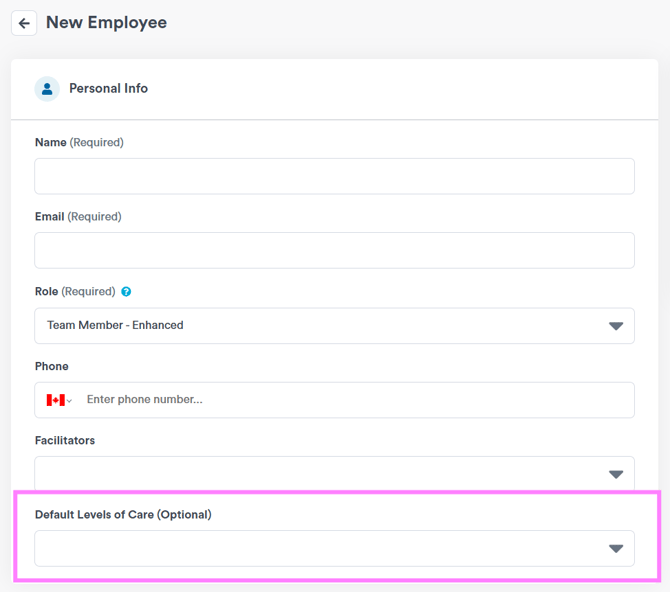
For an existing team member:
- Open the employee profile.
- Update the Level of Care setting.
- Save your changes.
This is set for each team member individually. There is no organization-wide step required to start using it, and team members can update their own default if they prefer.
How it behaves
Once a default is set, supported pages open filtered to that team member's Levels of Care. They can still change the filter while they work to view other residents. When they refresh the page or come back to it later, the view returns to their default. The employee's saved default always takes priority on reload.
Which pages this applies to today
Default Levels of Care currently applies to the pages your team uses most often:
- Overview
- Insights
- Attendance List
- Web Calendar
- Attendance page
- Program Registrants
- Residents List
Other pages are not yet included. This feature is being expanded over time, so more pages may be added in future releases.
A few common questions
- Do we have to set this up? No. It is completely optional.
- Will existing team members be updated automatically? No. You choose when to set a default for each person.
- Can a team member change their own default? Yes.
- What happens if they change the filter manually? They will see whatever they filter to while working. On refresh, the view resets to their saved default.