.png?width=180&height=55&name=welbi_logo_colour%20(6).png)
If your community uses FullCount for dining, residents and their families can view their FullCount dining account directly from the Welbi Community Portal, without a separate login. This puts account balances and recent activity in the same place residents already go for their community information.
From the portal, you can see your current dining balance, your transaction history, and recent account activity.
How residents access it
- Log in to the Community Portal.
- Open the Resources tab from the bottom navigation bar.
- Select FullCount.
- Your FullCount account opens right inside the portal.
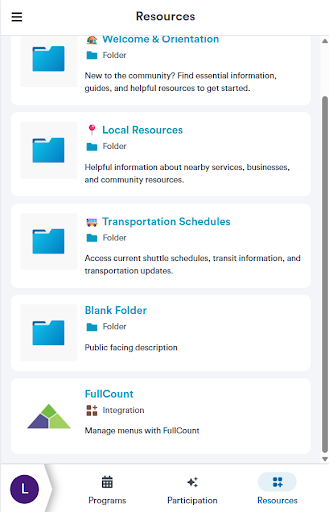
You will be signed in automatically, so there is no separate FullCount username or password to remember.
Households that share an email address
If more than one resident shares an email address (for example, spouses), each resident selects their own profile in the portal first. Welbi then opens the FullCount account that belongs to that specific resident, so everyone sees the correct balance and history.
For community administrators
FullCount in the Community Portal is set up for your community by Welbi and requires the Community Portal to be active. If you would like to offer it to your residents, or you want to customize how it appears (its name, description, or icon), reach out to your Welbi Customer Success representative.
If something doesn't look right
If a resident's balance or history appears incorrect, or they have trouble opening FullCount from the portal, contact Welbi Support and we will work with FullCount to resolve it.