.png?width=180&height=55&name=welbi_logo_colour%20(6).png)
How Residents Access FullCount
Residents can open FullCount directly from the Community Portal.
-
Log in to the Community Portal.
-
Tap or click Resources in the bottom navigation menu.
-
Select FullCount.
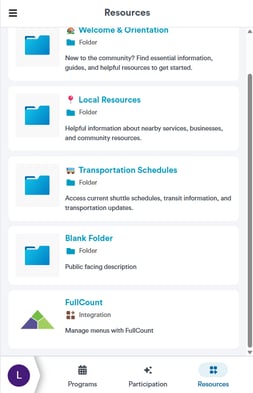
-
FullCount opens inside the portal.
The FullCount interface loads in a web view within the portal, allowing residents to stay inside the Community Portal experience.
What Residents Can See
When residents open FullCount, they can view their dining account information, including:
-
Current dining account balance
-
Remaining meal plan dollars or points
-
Transaction history
-
Recent purchases and charges
Transaction details may include:
-
Date and time of the purchase
-
Item purchased
-
Dining location or department
-
Amount charged
.png?width=185&height=398&name=unnamed%20(1).png)
How Resident Login Works
Residents do not need to log into FullCount separately.
When a resident opens FullCount from the Community Portal, they are automatically authenticated and taken directly to their dining account.
FullCount then loads the matching resident account.
Shared Email Addresses
Some residents living in the same unit may share an email address (for example, spouses).
In these cases:
-
The resident selects their profile when entering the Community Portal.
-
Welbi identifies the resident associated with that profile.
-
The correct FullCount account loads for that resident.
This ensures that each resident sees their own dining account information, even if they share an email address.
When Residents Ask Questions
Common questions staff may receive include:
“Why do I see FullCount in the portal?”
FullCount allows residents to check their dining account balance and transactions directly from the Community Portal.
“Do I need another login?”
No. Residents are automatically signed in when they open FullCount from the portal.
“Why does my spouse see a different balance?”
Each resident has their own dining account, so balances may differ even if residents share the same email address.