.png?width=180&height=55&name=welbi_logo_colour%20(6).png)
Before You Begin
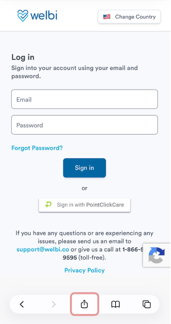
1. Open Safari on your mobile device and navigate to the Welbi login page.
2. Tap the Share icon at the bottom of the screen. The icon looks like a square with an arrow pointing upward.
5. Ensure Open as Web App is enabled (if available), then tap Add in the top-right corner.
- Ensure you have access to your Welbi login page.
- These instructions apply to Safari on iPhone and iPad.
1. Open Safari on your mobile device and navigate to the Welbi login page.
2. Tap the Share icon at the bottom of the screen. The icon looks like a square with an arrow pointing upward.
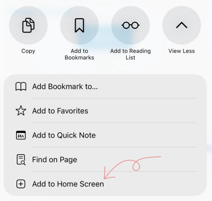
5. Ensure Open as Web App is enabled (if available), then tap Add in the top-right corner.
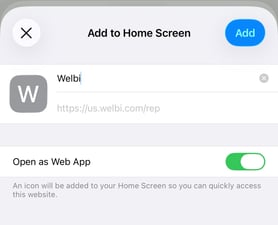
The Welbi icon will be added to your device's Home Screen. You can tap the icon at any time to open Welbi directly, just like a mobile app.