.png?width=180&height=55&name=welbi_logo_colour%20(6).png)
Before You Begin
-
Use Google Chrome as your browser.
-
Ensure your calendar is fully set up (layout, spacing, formatting) before translating.
Step 1: Open and Prepare Your Calendar
-
Open Google Chrome.
-
Log in to Welbi.
-
Navigate to Print Calendar.
-
Configure your calendar exactly how you would like it to appear (month, layout, spacing, formatting, etc.).
Tip: Make all formatting adjustments before translating for best results.
Step 2: Translate the Page
-
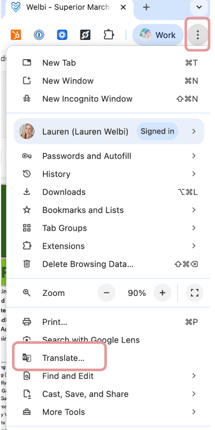
In Chrome, click the three dots (⋮) in the top-right corner of your browser.
-
Select Translate.
-
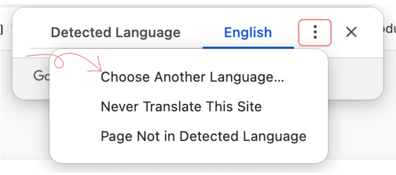
In the translation bar that appears, click the three dots (⋮) within the translation options.
-
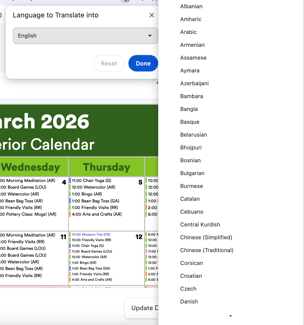
Choose your desired language (for example, French or Spanish).
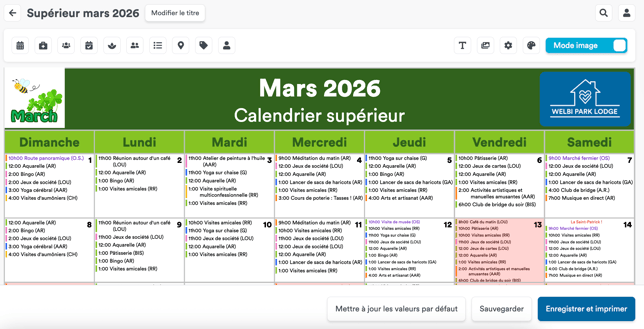
Your entire Print Calendar view will now be translated, including:
-
Program titles
-
Calendar text
-
Buttons and menu items
Note that free floating text boxes do not change
Step 3: Save and Print
-
Review the translated calendar.
-
If needed, make small formatting adjustments (spacing or line breaks may shift slightly after translation).
-
Click Save & Print (this button will also appear in the selected language).
-
Choose Save as PDF.
-
Open the saved PDF.
-
Print directly from the PDF file.
Troubleshooting
If anything looks slightly misaligned after translation:
-
Adjust spacing or formatting in the Print Calendar view.
-
Re-save as a PDF.
-
Print again once it looks correct.
Using Chrome’s translation feature is a quick and easy way to create calendars in different languages without manually re-entering program titles.